Parivahan Sewa DL, VAHAN & e-Challan
Tackling vehicle paperwork once meant long queues, piles of forms, and confusing steps at the RTO. Now, with Parivahan Sewa, many of those chores move online—saving time and cutting the hassle to just a few clicks.
Parivahan Sewa is the Government of India’s unified portal for vehicle-related services across the country. Built for convenience, speed, and transparency, it simplifies everything from licences to registrations. This guide highlights its key features and services so you can navigate the process smoothly and efficiently.
License Related Services
Manage your DL end-to-end online with the Sarathi portal. Book LL/DL appointments, take the learner’s test, apply or renew, request a duplicate for loss/damage, update details (address/photo/mobile), add a vehicle class, and track status with receipts.
Vehicle Related Services
Manage your vehicle registration online—book appointments, track status, request RC reissue/duplicate, update address, transfer ownership, and handle hypothecation/loan additions or closures.
| Feature | Description |
|---|---|
| Online Portal | Official government platform for transport services. |
| National Platform | Unified services available across India. |
| Key Services | Driving Licence (Sarathi), Vehicle Registration (VAHAN), and e-Challan. |
| User Access | Open to all Indian citizens. |
| Main Websites | parivahan.gov.in & sarathi.parivahan.gov.in |
Services Available on Parivahan Sewa
Parivahan Sewa provides a unified set of online transport services covering licenses, vehicle registration, permits, taxes, and more so most tasks can be completed from home.
Driving Licence Services (Sarathi)
- Apply for a Learner’s Licence (LL)
- Book or reschedule a driving test
- Renew your driving licence
- Track DL application/status updates
- Access all licence-related tasks via the Sarathi portal
Vehicle Registration Services (VAHAN)
- New vehicle registration
- Registration renewal (RC)
- Ownership transfer
- Duplicate RC for loss/damage
- Guidance on temporary vs. permanent registration
- Manage RC services through the VAHAN portal
Permit Services
- Apply for national or state permits
- Renew existing permits
Tax Services
- Pay road tax online
- Check tax status and payment history
Fitness Certificate
- Apply for and renew vehicle fitness certificates
Other Services
Check vehicle details (RC, insurance, etc.)
Fancy (VIP) number reservation
Benefits of Using Parivahan Sewa
- Reduced Paperwork and Queues: Avoid long lines and cumbersome paperwork.
- Increased Transparency: Track your applications and access information easily.
- Convenient Online Access: Access services from anywhere, anytime.
- Time and Cost Savings: Save valuable time and money on travel and manual processes.
Digital Driving License
Think of the Sarathi portal on Parivahan Sewa (sarathi.parivahan.gov.in) as your one-stop, state-wise hub—like a virtual RTO. Apply for LL/DL, book tests, renew or duplicate your licence, update details, pay fees, and track status online in a few clicks.
Get Started
- Apply for a Learner’s Licence (LL)
- Apply for a Permanent Driving Licence (DL)
Keep Your DL Updated
- Renew your driving licence
- Get a duplicate if it’s lost or damaged
- Update details (address, name, etc.)
Appointments & Downloads
- Book/reschedule learner’s and driving test appointments
- Print or download your e-DL/receipts
The Two Licence Types: Learner’s & Permanent
Learner’s Licence (LL) — Practice Permit
- Your starter permit for supervised driving on public roads.
- You must be accompanied by a valid DL holder; “L” plates and other conditions may apply.
- Usually valid for 6 months; extension/reissue depends on your state/UT rules.
Permanent Driving Licence (DL) — Full Privilege
- Authorises you to drive solo for the approved vehicle class.
- Issued only after holding an LL for the required period and passing the driving test.
- Comes with renewal intervals and compliance requirements set by your state/UT.
Eligibility — Quick Check
Age
- 16+ for motorcycles without gears (often needs parent/guardian consent).
- 18+ for geared two-wheelers and cars.
- 20+ for commercial/transport vehicles.
Health & Fitness
- Must be physically and mentally fit to drive (vision and general fitness per rules; medical certificate may be required).
Traffic Rules Knowledge
- Should know basic road signs and traffic rules — you’ll be tested during the Learner’s Licence process.
Note: Exact requirements can vary by state/UT. Keep ID, address proof, photos, and age proof handy.
Documents Checklist
| Proof of Identity | Aadhaar, passport, voter ID, etc. |
| Proof of Address | Aadhaar, passport, voter ID, or a recent utility bill (within 3 months). |
| Proof of Age | Birth certificate, Class 10 mark sheet, passport, etc. |
| Passport-size Photos | As per the specified size/background requirements. |
| Learner’s Licence (LL) | Required when applying for a Permanent DL. |
| Application Fees | Vary by state/UT and service type. Check the latest amounts on the Parivahan Sewa portal before applying. |
How to Apply for a Driving License
1. Visit the Parivahan Sewa Website:
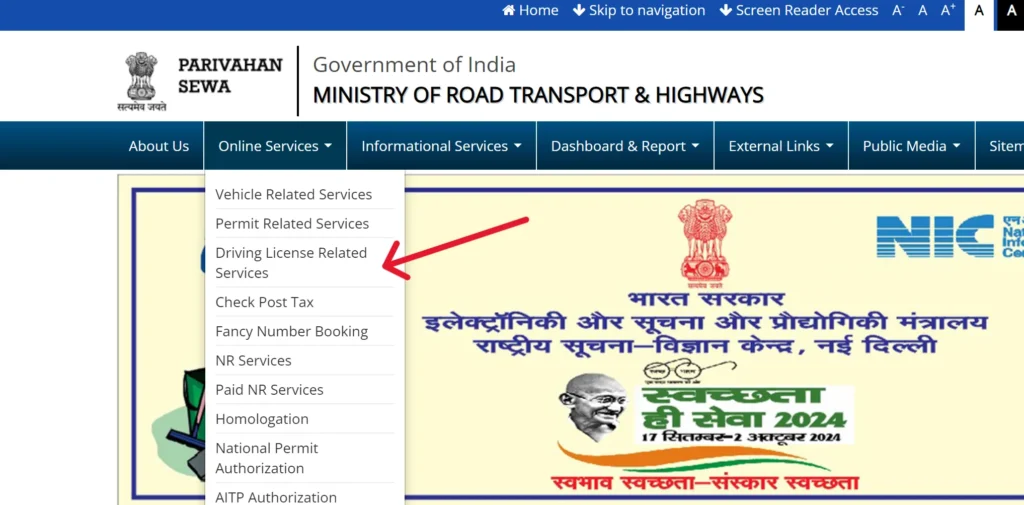
- Go to sarathi.parivahan.gov.in.
- Select your state.
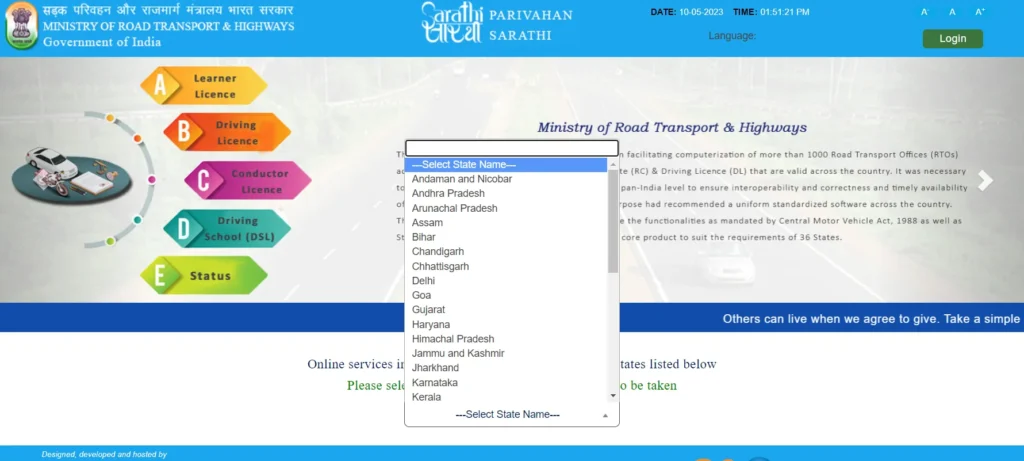
2. Apply for a Learner’s License:
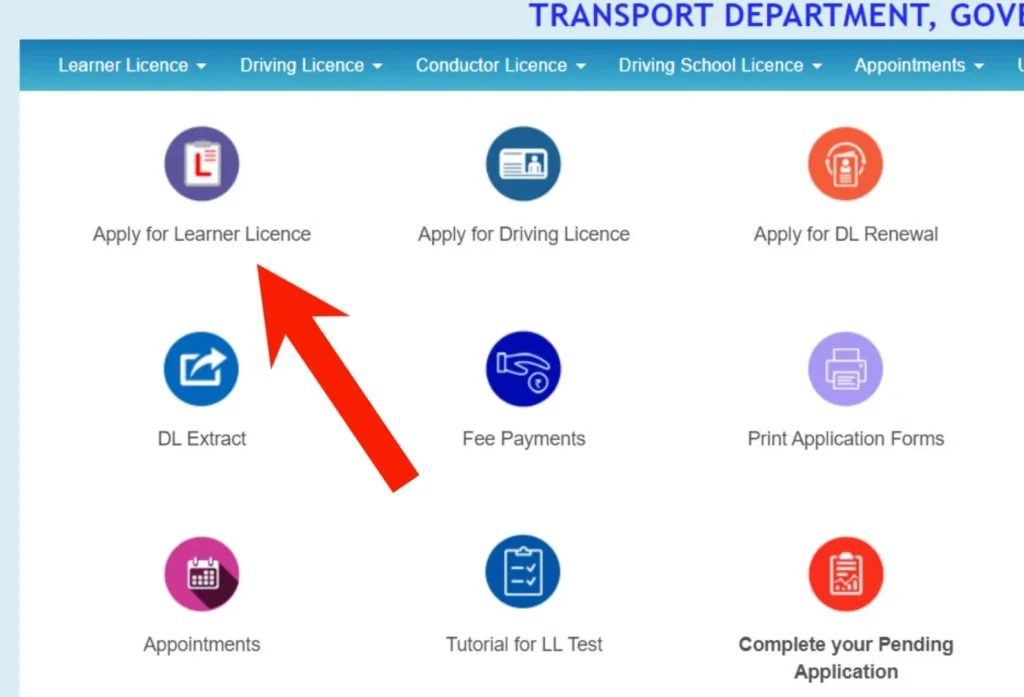
- Find the “Learner’s License” section and begin the application.
- Fill out an online form with your personal details.
- Upload required documents.
- Pay the applicable fee.
- You may need to take an online test.
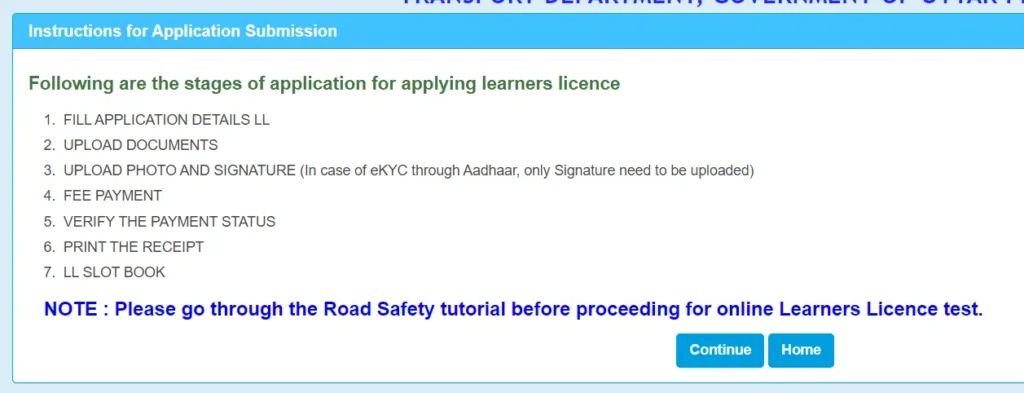
3. Learner’s Licence Test
Take and pass the test (online or at the RTO) to receive your LL.
4. Practice Driving
Drive with L-plates under the supervision of a valid DL holder.
5. Apply for Permanent DL
After the state-specific waiting period, submit the DL application online and book your road test.
6. Driving Test
Visit the RTO on your slot, carry required documents, and complete the practical test.
7. Receive Your Licence
On passing, your DL is issued (physical card or e-DL). Track dispatch/status online.
| Service | Fee (INR) |
|---|---|
| Learner’s Licence (LL) | ₹200 |
| Permanent Driving Licence (DL) | ₹200 |
| Driving Licence Renewal | ₹200 |
| Duplicate Driving Licence | ₹250 |
| International Driving Permit (IDP) | ₹1000 |
| Adding an Additional Vehicle Class to DL | ₹500 |
| Driving Licence Test | ₹300 |
| Late Renewal of DL (after grace period) | ₹300 + applicable fees |
Driving Licence Fees in India (indicative)
Note: Fees can vary by state/UT and may change. Always confirm the latest amounts on the Sarathi/Parivahan portal.
How to Check Your Driving License Application Status
1. Head to the Source:
- Open your web browser and go to the official Sarathi Parivahan website: sarathi.parivahan.gov.in.
2. Find the “Application Status” Section:
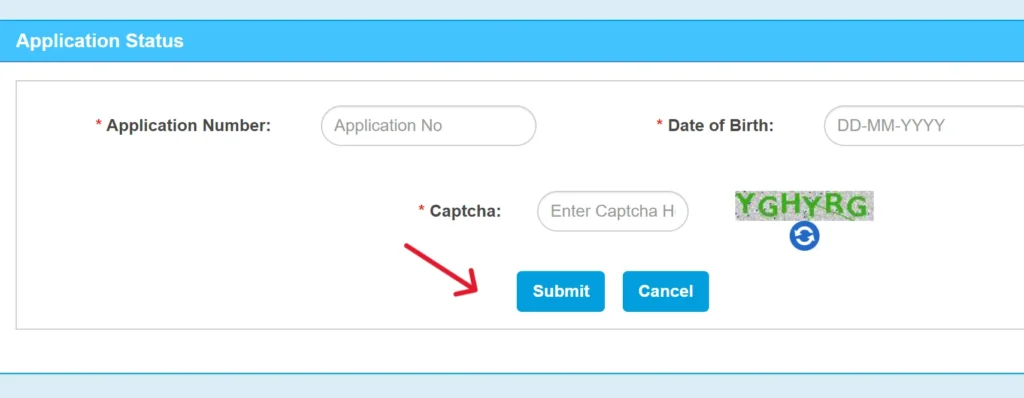
- Look for the area where you can check your application’s progress.
- It’s usually labeled clearly as “Application Status.”
3. Enter Your Details:
- Your application number (this is crucial!).
- Your date of birth.
- The captcha code (those squiggly letters and numbers that help verify you’re a real person).
4. Check Your Status:
- Click the “Submit” or “Check Status” button.
- You will see the current status of your driving license application.
Renewing Your Licence
1) Timing
- You can begin renewal up to 1 month before the expiry date.
- If your licence has been expired for over 5 years, you must apply for a new DL.
- Renew within 30 days of expiry: validity continues from the original expiry date.
- After 30 days: an additional ₹30 is charged and the new validity counts from the application date.
2) Documents Needed
- Current Driving Licence (DL)
- Form 2 (application for renewal)
- Form 1 (self-declaration of fitness for non-transport)
- Form 1A (medical certificate for transport/where required)
- Applicable renewal fee
3) How to Renew (Step-by-Step)
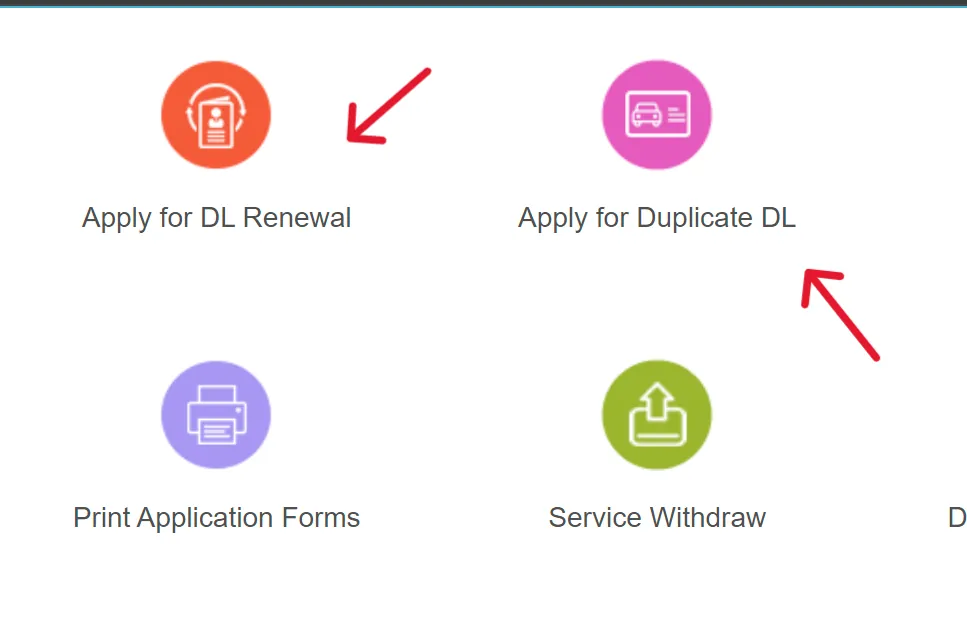
- Visit sarathi.parivahan.gov.in and select your State/UT.
- Choose Driving Licence → Renewal.
- Fill in details, select RTO, and upload documents.
- Pay the fee online and save the acknowledgement.
- Book an appointment if biometrics/verification is required in your state.
- Visit the RTO (if scheduled) with originals.
- Track status online and download e-DL/acknowledgement or receive the physical card per your state’s process.
Note: Exact forms, fees, and steps can vary by state/UT. Always follow the instructions shown for your state on Sarathi.

Duplicate Driving Licence
Life happens—cards get lost, damaged, or you just need an updated photo. Here’s how to get a duplicate DL quickly.
When you need a duplicate
- Lost / stolen licence
- Damaged or unreadable card (torn, faded, cracked)
- Photo replacement or minor detail corrections
Documents you’ll typically need
- Form 2 (DL application)
- Damaged original DL (if available)
- Attested photocopies if the DL is lost
- Prescribed fees / user charges
Some states may ask for an FIR/GD or affidavit for lost DL—follow your state’s instructions on Sarathi.
Apply online (Sarathi)
- Go to sarathi.parivahan.gov.in → Driving Licence Related Services → select your State/UT.
- Choose Apply for Duplicate DL / Replacement of DL.
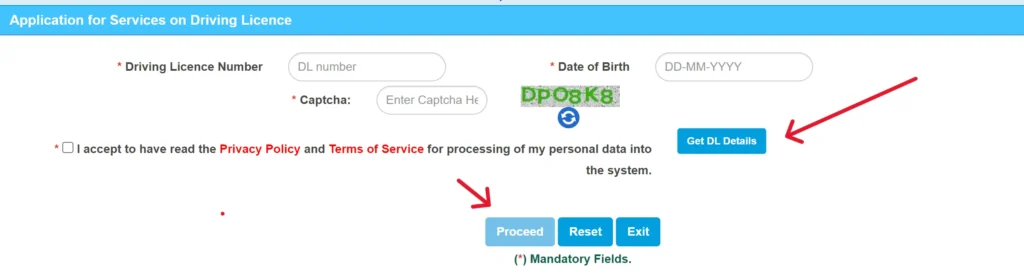
- Enter DL Number, DOB, and the captcha → Get DL Details.
- Verify details and add your contact info (mobile, email, address).
- Select Issue of Duplicate DL (or Replacement of DL) → Proceed.
- Complete the self-declaration of fitness (as applicable).
- Upload documents, pay the fee, and print the receipt/acknowledgement.
Tip: Keep originals handy for any in-person verification your RTO may require. Track status and download acknowledgements from the Sarathi portal.
- Book an Appointment and Visit RTO:
- Book an appointment slot.
- Take your documents to the RTO for verification.
- Your duplicate license will be mailed to you.
Required Information & Documents:
- Driving License Number
- Mobile Number
- Email ID
- Payment Slip
- Slot Booking Slip
Driving License Forms
| Form No. | Description |
|---|---|
| Form 1 | Self-declaration of physical fitness for non-transport vehicles. |
| Form 1A | Medical Certificate for transport vehicles. |
| Form 2 | Application for the grant or renewal of a driving license. |
| Form 3 | Learner’s License. |
| Form 4A | Application for the grant of a driving license. |
| Form 5 | Driving Certificate issued by a driving school or establishment. |
| Form 8 | Application for adding a new class of vehicle to a driving license. |
| Form 9 | Application for renewal of a driving license. |
Vehicle-Related Forms
| Form No. | Description |
|---|---|
| Form 25 | Application for renewal of vehicle registration certificate (RC). |
| Form 26 | Application for duplicate vehicle registration certificate. |
| Form 28 | No Objection Certificate (NOC) for vehicle transfer. |
| Form 29 | Notice of transfer of vehicle ownership. |
| Form 30 | Application for the transfer of vehicle ownership. |
| Form 35 | Application for termination of a hypothecation (loan) on a vehicle. |
Parivahan Sewa: Vehicle Services & e-Challan
Parivahan Sewa is your central hub for online vehicle services—RC registration/renewal, ownership transfer, hypothecation updates, permits, fitness, and e-Challan payments—all in one place.
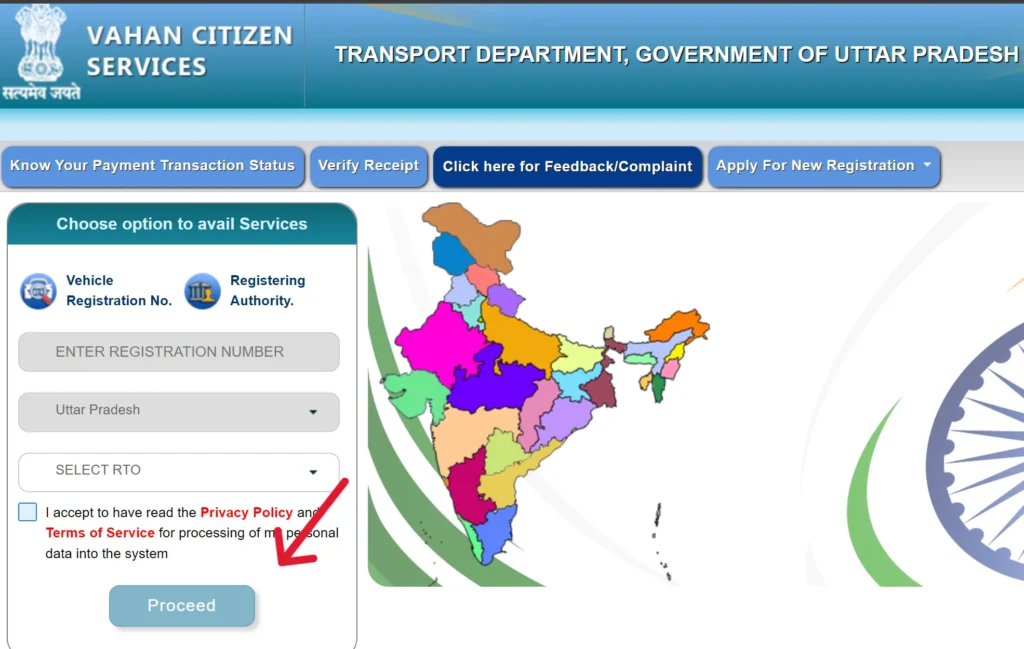
Accessing Vehicle Services (VAHAN)
- Visit: parivahan.gov.in
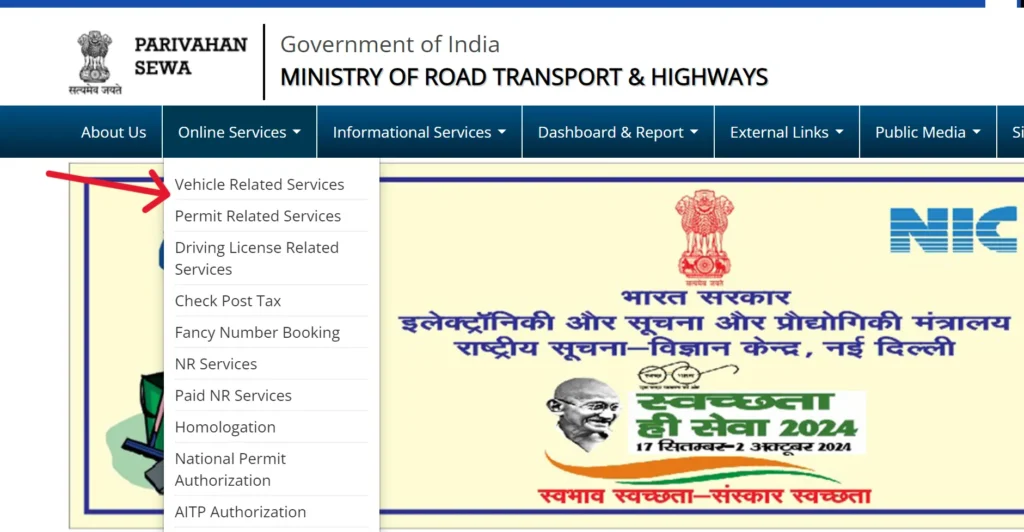
- Go to Online Services → Vehicle Related Services (VAHAN).
- Select your State/UT and RTO.
- Choose a service (New Registration, RC Renewal, Ownership Transfer, Duplicate RC, Address Change, Add/Remove Hypothecation, etc.).
- Enter details, upload documents, pay fees, and download the receipt/acknowledgement.
Managing Traffic Violations: eChallan
Nobody likes getting a traffic ticket, but the Parivahan portal makes it easy to check and pay eChallans online.
Checking and Paying eChallans:
- Go to Parivahan: Visit parivahan.gov.in.
- Find eChallan: Click on “Online Services” → “eChallan.”
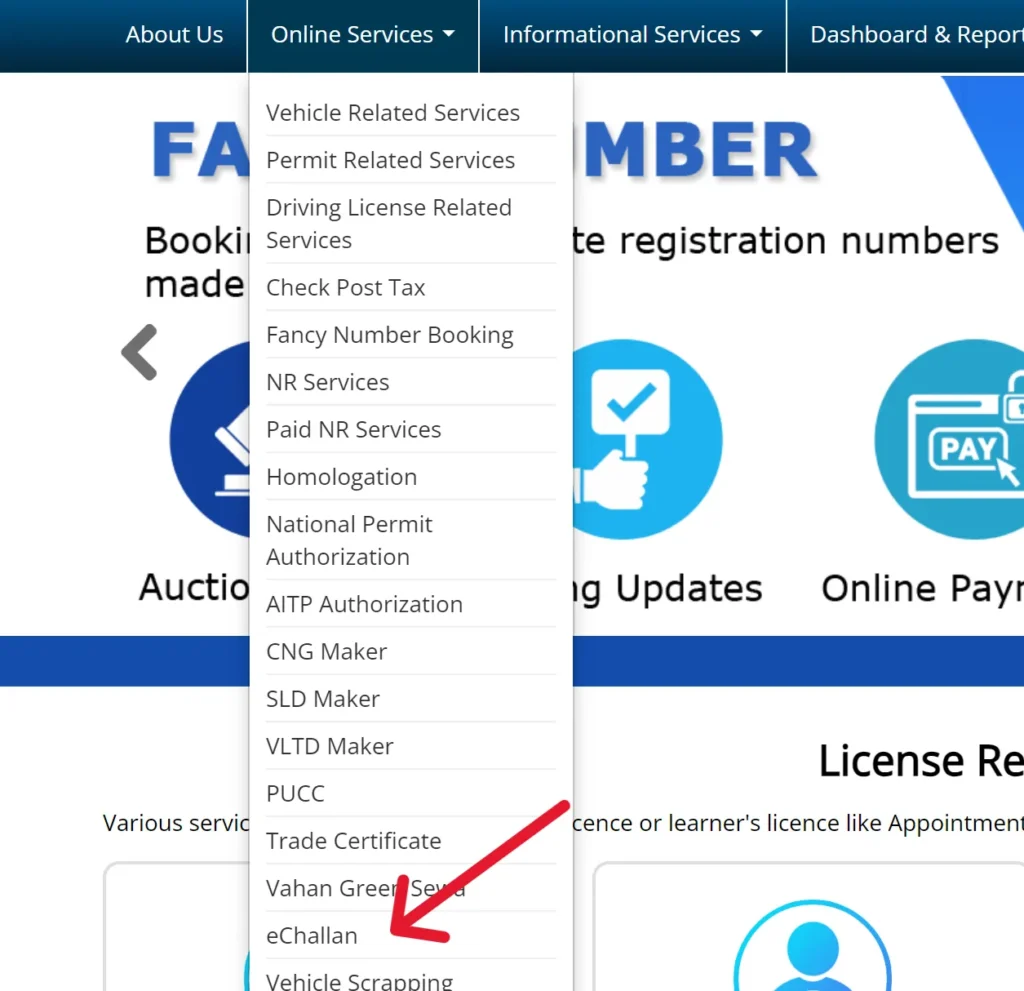
- eChallan Website: You’ll be redirected to echallan.parivahan.gov.in.
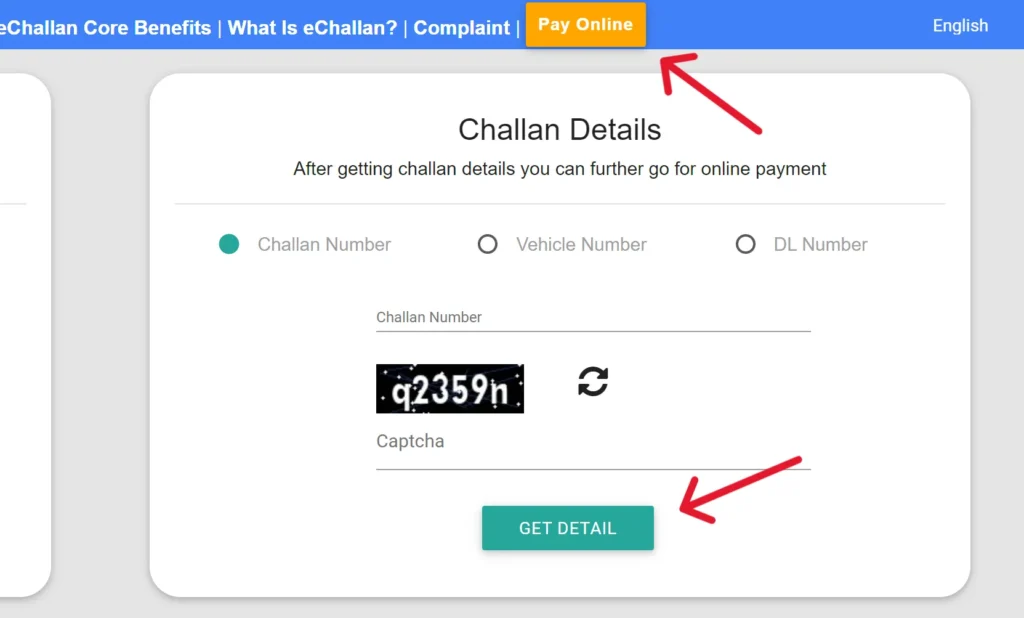
- Check Challan Status: Click on “Challan Status” under “Check Online Services.”

- Enter Details: Provide your Challan Number, DL Number, or Vehicle Number.
- Get Details: Click “Get Details.”
- View and Pay: Your challan details will appear, and you can proceed with online payment.
Helpline Contact Information
If you encounter any issues, you can contact us using the details provided below:
| Problem | Email ID |
|---|---|
| Vehicle Registration, Fitness, Tax, Permit, Dealer | helpdesk-vahan[at]gov[dot]in |
| Learner License, Driving License | helpdesk-sarathi[at]gov[dot]in |
| mParivahan Services | helpdesk-mparivahan[at]gov[dot]in |
| eChallan Services | helpdesk-echallan[at]gov[dot]in |
FAQs
1) What is Parivahan Sewa?
Parivahan Sewa is the Government of India’s online platform that bundles vehicle and driving-licence services—via Sarathi, VAHAN, and e-Challan—so common RTO tasks are easier and faster.
2) How do I apply for a driving licence online?
Go to sarathi.parivahan.gov.in, choose your State/UT, fill the form, upload documents, pay the fee, and book your test slot. You can track status on the same portal.
3) How can I check my vehicle registration details?
Visit parivahan.gov.in → Vehicle Related Services (VAHAN), select State/RTO, enter your registration number, and view RC details.
4) How do I check and pay an e-Challan?
Open echallan.parivahan.gov.in, search by vehicle number/DL/challan number, confirm the details, pay securely, and download the receipt.
5) Can I renew my driving licence through Parivahan Sewa?
Yes. On Sarathi, select Driving Licence → Renewal, complete the form, upload documents, pay the fee, and visit the RTO if your state requires in-person verification.
6) How do I transfer vehicle ownership online?
Go to parivahan.gov.in → Vehicle Related Services (VAHAN), choose Transfer of Ownership, enter vehicle details, upload the required documents, pay the fee, and submit.
Note: Exact steps, forms, and fees can vary by State/UT. Always follow the instructions shown for your state on the portal.